M3U vs Xtream Codes is the first question most people meet when they open an IPTV app, because the app asks which one you want to use. They are simply two ways of giving the app your subscription details. This guide explains both in plain English and helps you pick the right one.
In This Guide
What Is an M3U Playlist?
An M3U file is a plain text list. Each entry holds a channel name, sometimes a logo and group, and the web address of the stream. Your provider gives you either a file or, more often, a long link that the app downloads.
The format began life as a playlist for music players, which is why almost every media app can read it.
What Is Xtream Codes?
Xtream Codes is a login method. Instead of one long link, you enter three short items: a server address, a username and a password. The app then asks the server for everything it needs, including live channels, films, series and the TV guide, already sorted into categories.
You may see it labelled as “Xtream Codes API”, “XC login” or simply “Login with username and password”.
M3U vs Xtream Codes: 6 Key Differences
1. What you type
M3U means pasting or typing one long link, which is awkward with a TV remote. Xtream Codes means three short fields, which is much easier to get right.
2. How content is organised
With Xtream Codes, live TV, films and series arrive in separate sections with proper categories. An M3U playlist is one long list, and how well it is grouped depends on the file.
3. The TV guide
Xtream Codes normally loads the guide automatically. With M3U you often need to add a second link for the guide, known as an EPG or XMLTV address.
4. Updates
When channels change, an Xtream Codes login updates the next time the app refreshes. An M3U link refreshes too, but a downloaded M3U file is a snapshot and goes out of date.
5. Loading speed
A very large M3U playlist can take a while to download and may slow an older stick. Xtream Codes fetches each section as needed, so big line-ups tend to feel quicker.
6. Compatibility
Almost everything reads M3U, including desktop media players. Xtream Codes is supported by most dedicated IPTV apps, but not by general media players.
At a Glance
| M3U | Xtream Codes | |
|---|---|---|
| You enter | One long link or file | Server, username, password |
| Films and series sections | Depends on the playlist | Yes, separate |
| TV guide | Often a second link | Usually automatic |
| Best for | Computers, simple players | TVs, sticks and phones |
Which One Should You Use?
If your app offers both, choose Xtream Codes. It is easier to enter, better organised and brings the guide with it. Use M3U when your app only accepts playlists, or when you are watching on a computer with a general media player.
Some Samsung and LG apps use a third method, where you send the provider a device code shown on screen. Our round-up of the best IPTV player apps shows which apps use which method.
Keep Your Details Safe
- Treat your link or login like a password. Anyone who has it can use your subscription.
- Do not post screenshots that show the full link or your username.
- Only enter your details in a player app you installed yourself from a source you trust.
- If you think your details have been shared, ask your provider to reset them.
M3U vs Xtream Codes: What Is Inside an M3U Link
An M3U link looks like a random string, but every part of it has a job. Seeing how it is put together removes most of the mystery from M3U vs Xtream Codes, because the two formats turn out to contain exactly the same information.
A typical link follows this pattern:
http://tv.example.com:8080/get.php?username=YOURNAME&password=YOURPASS&type=m3u_plus&output=ts
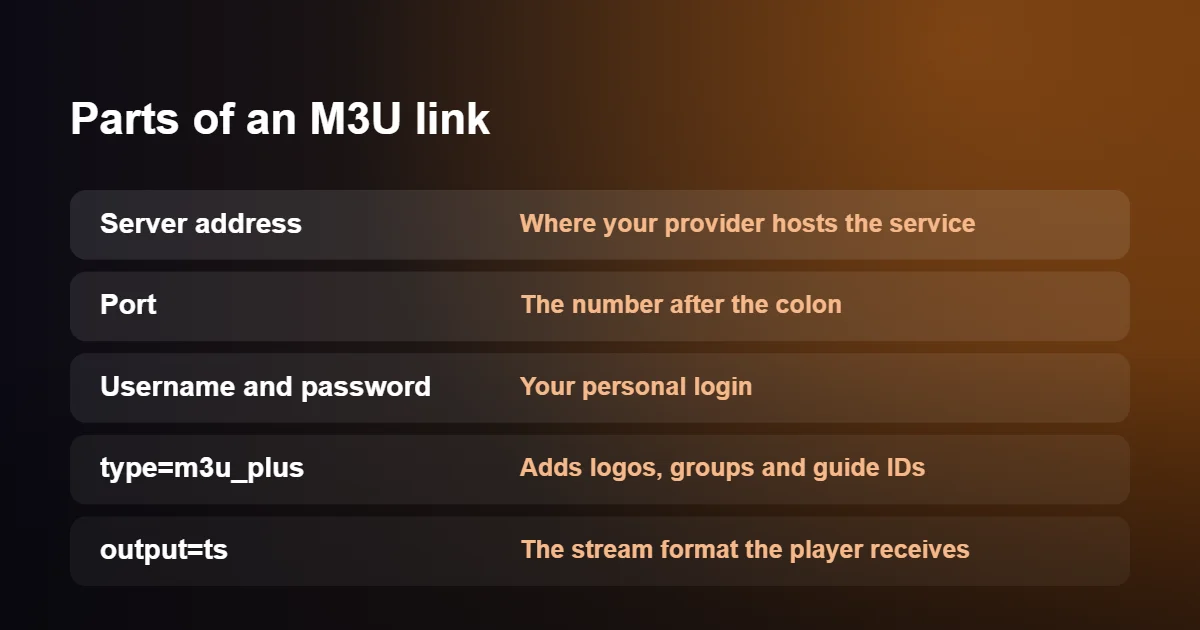
- The server address is everything before the colon. It tells the player where your provider’s service lives.
- The port is the number after the colon. Leave it out and the player knocks on the wrong door.
- The username and password identify your account. They are case sensitive, so a capital letter typed in lower case is enough to be refused.
- type=m3u_plus asks for the fuller version of the list, with channel logos, group names and the codes that link each channel to the TV guide. A link that says only m3u still plays, but the list looks bare.
- output=ts sets the stream format. Most players are happy with ts; a few work better with the alternative, m3u8, which you may see described as HLS.
When a player opens the link, the server sends back a text file. The first line reads #EXTM3U, and after that every channel takes two lines: one starting with #EXTINF that holds the name, logo and group, and one containing the address of the stream itself. A list with twenty thousand channels is therefore a text file forty thousand lines long, which is why a big playlist can take a while to load on a modest device.
How Xtream Codes Details Use the Same Server
In the M3U vs Xtream Codes comparison, Xtream Codes details are the same three facts, handed over separately: the server address with its port, the username and the password. The difference lies in what the player does with them. Instead of downloading one enormous file, it asks the server a series of short questions. Which live categories exist? Which channels are in the category that has just been opened? Which films were added this week? What is on this channel tonight?
Because each answer is small, the app opens quickly and only fetches what you look at. It also receives things a plain playlist does not carry at all, such as the expiry date of your subscription, the number of connections you are allowed and proper descriptions for films and series.
Since both formats describe the same account, you can turn one into the other yourself.
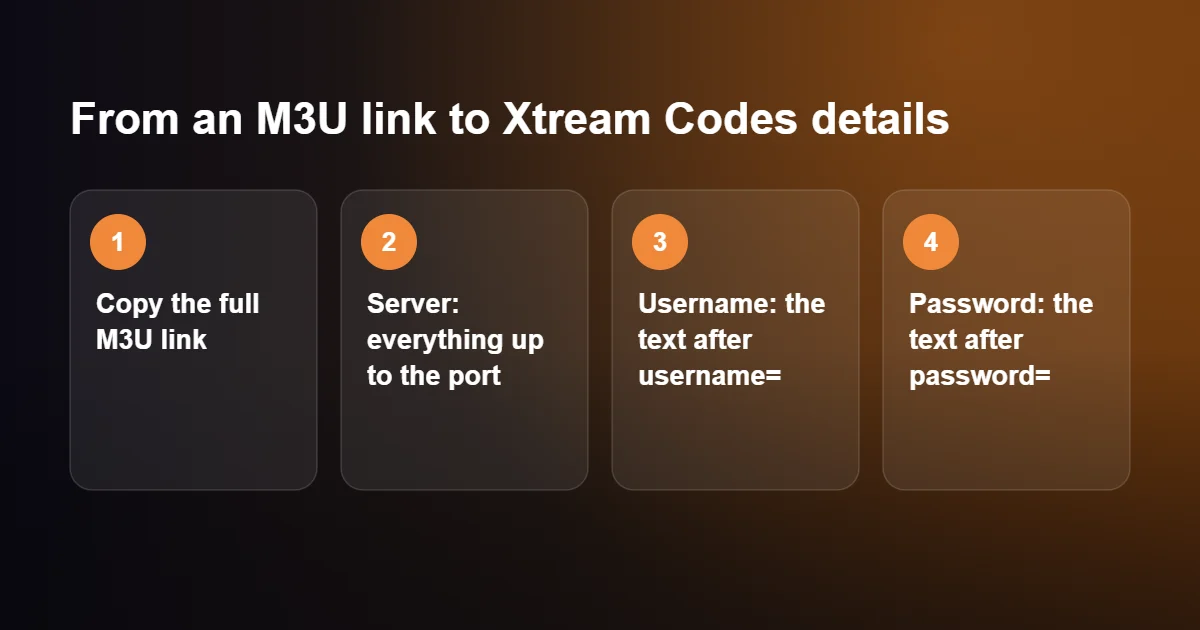
- Copy your full M3U link into a note.
- Take everything from http up to and including the port number. That is the server address, sometimes labelled URL, host or portal in an app.
- Find username= in the link. The text between it and the next & symbol is your username.
- Find password= in the link. The text between it and the next & symbol is your password.
To go the other way, drop your details into the pattern shown in the previous section. Either way, the M3U vs Xtream Codes choice never locks you in: one login gives you both.
M3U vs Xtream Codes on Each Device
The right answer to M3U vs Xtream Codes depends less on taste than on the device in front of you and the app installed on it. This table covers the common cases.
| Device | Typical apps | Use |
|---|---|---|
| Firestick and Android TV | TiviMate, IPTV Smarters Pro, XCIPTV | Xtream Codes |
| Samsung and LG smart TVs | IBO Player, Smart IPTV | Usually an M3U link added through the app’s website |
| iPhone, iPad and Apple TV | App Store players | Xtream Codes |
| Windows and Mac | VLC, IINA, Kodi | M3U link |
| MAG box | Built-in portal | Neither: a portal URL and the box’s MAC address |
Smart TV apps deserve a word of explanation, because they handle M3U vs Xtream Codes in their own way. Typing a long link with a television remote is so awkward that most of these apps give each television an ID and ask you to add the playlist on a web page from your phone or computer. That page nearly always has a box for an M3U link, and often a second tab for Xtream Codes details; when both are offered, pick the second.
Once you have settled M3U vs Xtream Codes for your device, step-by-step instructions are in our guides to IPTV on Android TV, IPTV on Apple TV, IPTV on Windows and IPTV on MAG Box.
The TV Guide and XMLTV Links
The programme guide is the area where people notice M3U vs Xtream Codes most. With Xtream Codes details the guide needs no setup, because the player requests schedules from the same server as the channels. With an M3U link the playlist only says which channels exist. The schedules live in a second file, in a format called XMLTV, and many players expect you to add its address separately in a field labelled EPG URL or XMLTV.
That second address follows the same pattern as the playlist link, with xmltv.php in place of get.php and without the type and output parts at the end. If your guide is empty in an M3U-based player, a missing EPG address is the reason nine times out of ten. Guide data is also large, so the first download can take a few minutes, and most players refresh it once a day in the background.
If programme times are shifted by exactly one or two hours, neither side of M3U vs Xtream Codes is at fault. Look for a setting called EPG time offset or time shift in the player and adjust it until the guide agrees with what is on screen.
Login Errors With M3U vs Xtream Codes and How to Fix Them
Whichever side of M3U vs Xtream Codes you are on, almost every failed login comes down to a small copying mistake, and the error message usually points to which one.
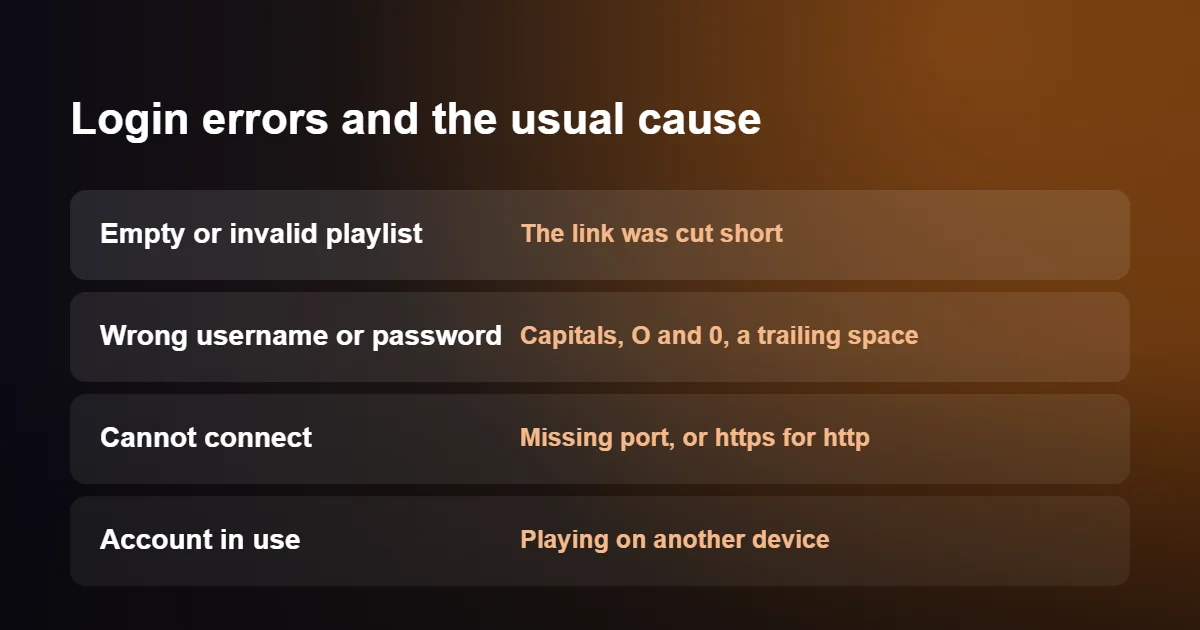
The playlist is empty or invalid
The link was cut short. Email programs and messaging apps sometimes break a long link across two lines, and only the first half is copied. Copy it again from the original message and check that it ends with the output part.
Wrong username or password
Check capital letters, and look for characters that are easily confused: the letter O and the number 0, a lower-case l and the number 1. Keyboards on phones and televisions also like to add a space after the last character, which the server treats as part of the password.
Cannot connect to the server
The port number is missing, or https was typed where the address begins with http. Enter the address exactly as supplied. If it worked yesterday and fails today on every device, your provider may have moved to a new address; ask support for the current one.
The account is already in use
Each subscription allows a set number of streams at once. If a channel is still playing on another device, or an app was left open on a box in another room, the server may refuse a new one. Close the other player and try again after a minute.
The link downloads a file in my browser
That is normal. A browser does not know how to play a playlist, so it saves it. Paste the link into a player app instead.
Does M3U vs Xtream Codes Affect Picture Quality?
No. In terms of picture, M3U vs Xtream Codes makes no difference: both formats lead to the same streams on the same server, so resolution, sound and stability are identical. A channel that is sharp with one login type is equally sharp with the other, and a channel that struggles at eight on a Saturday evening will struggle either way.
What M3U vs Xtream Codes does change is how the app behaves around the stream. A very large playlist takes time to download and uses memory once loaded, and on an older stick with little memory to spare this can make menus slow or, occasionally, cause the app to close. Xtream Codes avoids that by loading one category at a time. If the picture itself is the problem, the cause lies elsewhere, and our IPTV buffering fix guide is the place to start.
Changing App or Device Later
Your login belongs to your subscription, not to an app, and that is true on both sides of M3U vs Xtream Codes. You can enter the same details in a second player on the same device, on a tablet, or on a television in another room, without telling anyone. What is limited is how many of those devices can play at the same moment.
The formats do differ when something changes on the provider’s side. If the server address is updated, an Xtream Codes user opens the playlist settings, edits one field and carries on with favourites intact. An M3U user generally has to remove the old link and add the new one, and in some apps favourites are tied to the old list. It is one more reason to prefer Xtream Codes wherever the app supports it, and to keep the M3U link as a spare.
Why It Is Still Called Xtream Codes
The name confuses newcomers to M3U vs Xtream Codes, because it sounds like a set of secret codes. Xtream Codes was originally a piece of management software used by television providers, and the way it handed out logins became so widespread that player apps built support for it. The original software was discontinued in 2019, but the login format outlived it and is now used by many different systems. When an app today asks for an Xtream Codes login, it simply means the three-part format of server, username and password described on this page.
M3U vs Xtream Codes: A Decision Checklist
If you would rather not think about M3U vs Xtream Codes again, run through these questions once and write the answer next to your login.
- Does your app have a login screen with three boxes for server, username and password? Use Xtream Codes.
- Does it only offer a single box for a playlist address? Use the M3U link, and add the guide address as well.
- Are you on a computer with VLC, IINA or Kodi? The M3U link is the only option, and it works well.
- Is your device short on memory, or slow to open the channel list? Switch to Xtream Codes to lighten the load.
- Do you want films and series with posters and descriptions? Xtream Codes again.
- Are you using a MAG box? Ignore both and ask for the portal URL.
Most households end up with a mixture: Xtream Codes on the main television, an M3U link in VLC on a laptop. That is a perfectly sensible outcome of the M3U vs Xtream Codes question, and it costs nothing extra because both come from the same subscription.
M3U vs Xtream Codes: Quick Questions
Can I use both at the same time?
Yes. You can add the M3U link in one app and the Xtream Codes details in another. They are the same account, so they share the same connection limit.
What is an M3U8 file?
It is an M3U playlist saved in a text encoding that copes with accented and non-Latin characters. The same extension is used for HLS streams. For everyday purposes, treat M3U and M3U8 as the same thing.
Do my details expire?
They last as long as your subscription. When you renew, the same login normally carries on working and nothing needs to be re-entered.
Can I edit the playlist to remove channels I do not want?
You can, since an M3U file is plain text, but the changes are lost whenever the player downloads a fresh copy. It is easier to hide unwanted groups inside the player and build a favourites list.
Which should a beginner choose in the M3U vs Xtream Codes debate?
Xtream Codes, if the app offers it. There is less to type, the guide sets itself up and updates happen without any effort on your part.
Getting Your Login
With British IPTV Direct, M3U vs Xtream Codes is never a blocker: tell us which app you use and we send the login details in the format it needs. Follow our IPTV setup guides to enter them, or start with a free 24-hour trial to see it working on your own device.